
Video: Creating a Zircon3D Dashboard Card in Home Assistant
-
https://youtu.be/Bhc6KOWZwgQ?si=jv7txi1SMD2ON_aB
Note: If an embedded Zircon3D view doesn’t load, open HA via port 11200, then copy the Zircon3D view link using :11200. This avoids the ingress authentication issue.
You can access Zircon3D via port 8123, but you’ll need to authorize it first by clicking the Zircon3D tab in the Home Assistant left sidebar.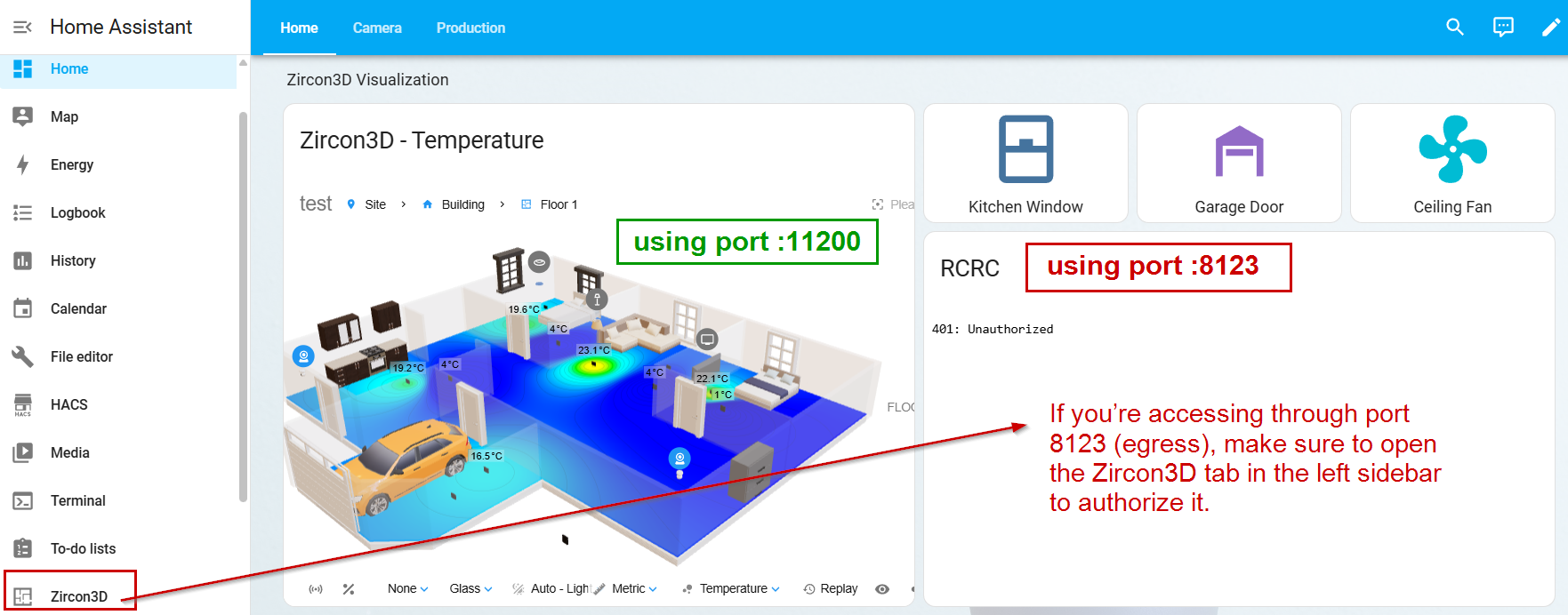
In this video, I’ll show you how to add Zircon3D as a dashboard card in Home Assistant using the Sectional Dashboard. You’ll learn how to:
 Open a Zircon3D project and adjust the viewer settings
Copy the viewer URL and add it as a Webpage card in Home Assistant
Customize the floorplan view, including top-down mode, themes, and heatmaps
Control smart devices directly from the dashboardThis method allows you to integrate real-time 3D visualization with Home Assistant for a more interactive and dynamic smart home setup.
If you have any questions or feedback, visit the Zircon3D Community at https://zircon3d.com/.
 Watch the full guide and follow along!
 -
T Tami Liu pinned this topic on
-
Hello! It looks like you're interested in this conversation, but you don't have an account yet.
Getting fed up of having to scroll through the same posts each visit? When you register for an account, you'll always come back to exactly where you were before, and choose to be notified of new replies (either via email, or push notification). You'll also be able to save bookmarks and upvote posts to show your appreciation to other community members.
With your input, this post could be even better 💗
Register Login