🚀 Zircon3D v2.0 is Here --- 30-Days Free Trial for PRO
-
We’re excited to announce the release of Zircon3D v2.0, packed with powerful new features and improvements to help you get even more from your smart home visualization.
And here’s the good news: starting with this version, every new and existing user gets a 30-day free trial of PRO. More details
That means you can experience all the advanced features like Custom Heatmap Layers, Heatmap Replay, and more Pro features for a full month. It’s the perfect chance to explore everything Zircon3D can do before you decide whether to upgrade.
New Features & Improvements
[Pro] Custom Heatmap Layers
Create your own heatmaps for CO₂, Wi-Fi signal, power usage, sunlight intensity, or any other numeric data from Home Assistant. Flexible matching rules and color ranges give you full control.
 Watch how it works:
https://youtu.be/MVT3vvEO9no
[Pro] Heatmap Replay
Bring your sensor history to life! Heatmap Replay lets you watch changes unfold over time, making patterns and anomalies easier to spot.
See it in action:
https://youtu.be/P3rhuf6buDk
Enhanced Viewer – Fully Configurable View Profiles
Save and reuse your preferred perspectives with View Profiles. Adjust angles, overlays, layers, and visual styles, then display your views directly in Zircon3D or embed them into your Home Assistant dashboard.
Learn more:
https://youtu.be/Bhc6KOWZwgQ
Enhanced Layout
We’ve reorganized the UI to make Viewer the central focus. Viewer is now designed for everyday use, navigating, monitoring, and working with your data. While Designer (Edit mode) is mainly for building your project and 3D floorplan. This way, once your floorplan or site is created, you can stay in the Viewer and interact with your system without switching back and forth.
Customize Models
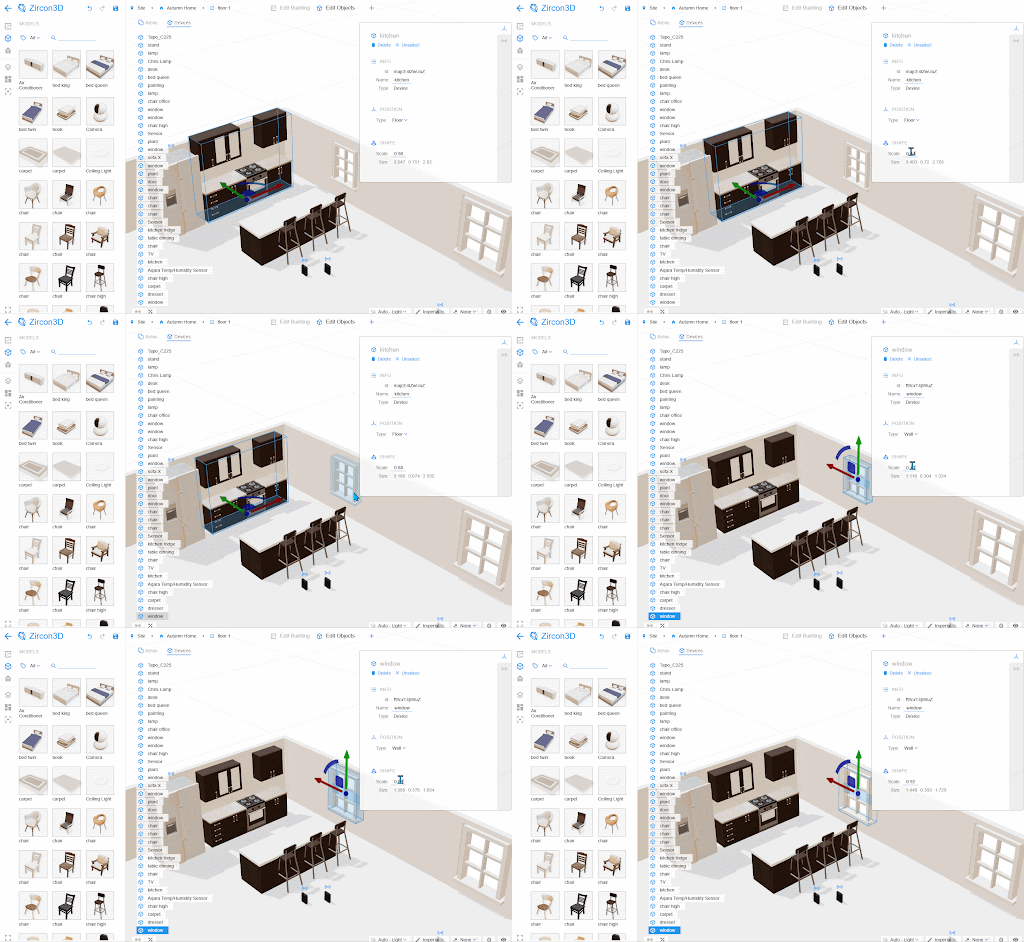
Models like windows, doors, and furniture can now be resized by scaling, giving you more flexibility to adjust object dimensions and better match your real-world setup.
Unlimited Dashboards for Free Users
Free Plan users can now create as many dashboards as they want - no limits!
Expanded Pro Quotas
Pro users now get 200 sensors per project and up to 4 projects - that’s 800 sensors total, doubling the previous limit.
 30-Day Free Trial of Pro
Try all PRO features for free with our new 30-day trial. Explore the full power of Zircon3D before you decide to upgrade.
Thank You!
A big thank you to our growing community for your support, ideas, and feedback. Zircon3D v2.0 is built on what you’ve been asking for, and we can’t wait to see how you’ll use these new features.
 Get started today: https://zircon3d.com

Hello! It looks like you're interested in this conversation, but you don't have an account yet.
Getting fed up of having to scroll through the same posts each visit? When you register for an account, you'll always come back to exactly where you were before, and choose to be notified of new replies (either via email, or push notification). You'll also be able to save bookmarks and upvote posts to show your appreciation to other community members.
With your input, this post could be even better 💗
Register Login