
Hi, thanks for reporting this.
To help us narrow this down, could you please check the following?
-
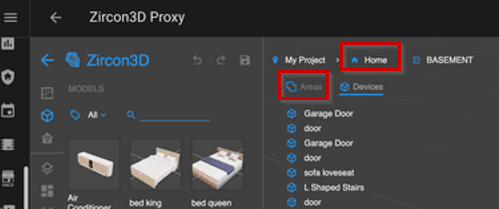
Home node check
In the top navigator, please click on the Home node.
Do you see the list of floors there, or does it also fail to load? -
Areas list under the floor
When you select the Basement floor, please click the Areas sub-tab under the navigator.
This should show a list of all areas on that floor, does it appear correctly? -
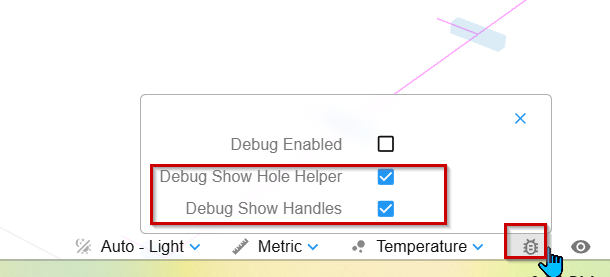
Enable debug helpers
Please open the Debug tool (see the screenshot I attached), then enable:
Debug Show Hole Helper
Debug Show Handles
After enabling these, see what happens in the scene.
If possible, please send us screenshots of what you see — that would be very helpful.
Also, is there anything special or unusual about this floor?
For example:
very large or complex geometry
many holes / cut-outs
This doesn’t look like a hardware limitation at first glance, but the answers above should help us confirm where the issue is coming from.