
slider button for shades
-
Hi, I’m new to Home Assistant.
I have several motors controlling my window shades, and I’d like to control them from a 3D map of my home. Ideally, I want to click on a window in the map and see a slider that lets me adjust the shade position.
What is the best way to achieve this?
-
Hi Nima, thanks for your question!
At the moment, shade/cover controls (such as a position slider) are not yet supported in the UI. However, we’ve discussed this with our team, and support for window shades, including slider-based position control, is definitely on our roadmap for a future update.
If I may ask, what brand or integration are you using for your shade motors? This helps us ensure the feature works well with real-world setups.
In the meantime, you can still link your shade entities to objects in the 3D view and monitor their state. Interactive control (like adjusting the position directly from the floorplan) will be available in a future release.
Thanks again for your feedback, it’s very helpful for us!
-
Hi, thank you for the follow-up.
I'm using the Tuya integration.
I also have an unrelated question: why isn’t your app more touch-friendly?
-
Hi, thank you for the follow-up.
I'm using the Tuya integration.
I also have an unrelated question: why isn’t your app more touch-friendly?
@Nima-Hamed Thanks for the reply!
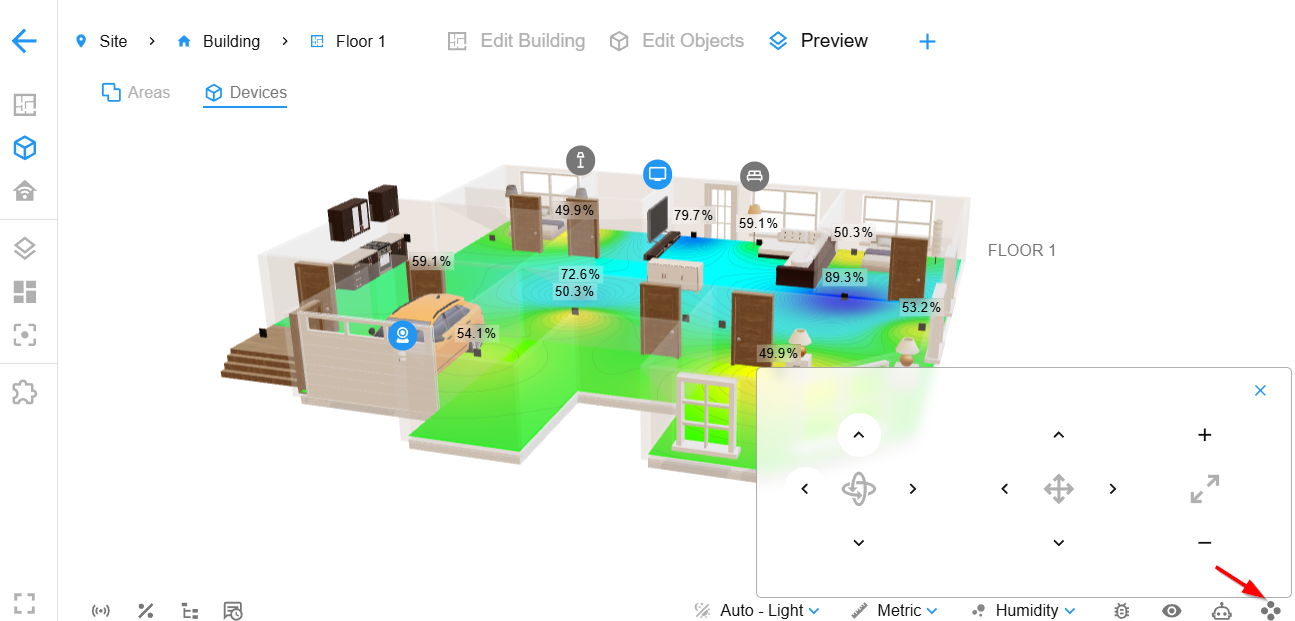
Tuya is great to know, that helps us a lot when planning support.Regarding the touch experience: in our latest version, we’ve introduced a Control panel designed for touch devices (please see the attached screenshot). This is a temporary solution to improve usability on phones and tablets.
If you don’t see the control icon in the bottom bar, please make sure your add-on is updated to the latest version.
We agree that touch interaction is very important, and improving it is definitely on our roadmap. We’ll continue refining the experience and adding more touch-friendly features in future updates.
Thanks again for your feedback!


Hello! It looks like you're interested in this conversation, but you don't have an account yet.
Getting fed up of having to scroll through the same posts each visit? When you register for an account, you'll always come back to exactly where you were before, and choose to be notified of new replies (either via email, or push notification). You'll also be able to save bookmarks and upvote posts to show your appreciation to other community members.
With your input, this post could be even better 💗
Register Login