
FAQ: Monitoring
-
Overview
Zircon3D supports both x86 and ARM architectures (including Raspberry Pi and other ARM64 systems), and is designed with a strong focus on performance and efficiency, even on low-power hardware.
For the best experience, we currently recommend doing floorplan design and editing on a desktop or laptop computer, where the web-based designer works best with a mouse. Viewing dashboards and 3D models works well on tablets and phones, and we plan to further improve rotation and dragging interactions on mobile devices in future versions.
Integrating Monitoring Devices from Home Assistant
If you haven’t installed the Zircon3D Proxy for Home Assistant yet, please follow the instructions in this guide:
Install Zircon3D Proxy for Home AssistantAfter installing the Zircon3D Add-on, monitoring devices from your Home Assistant setup will be automatically retrieved and listed under the Monitoring tab on the left sidebar.
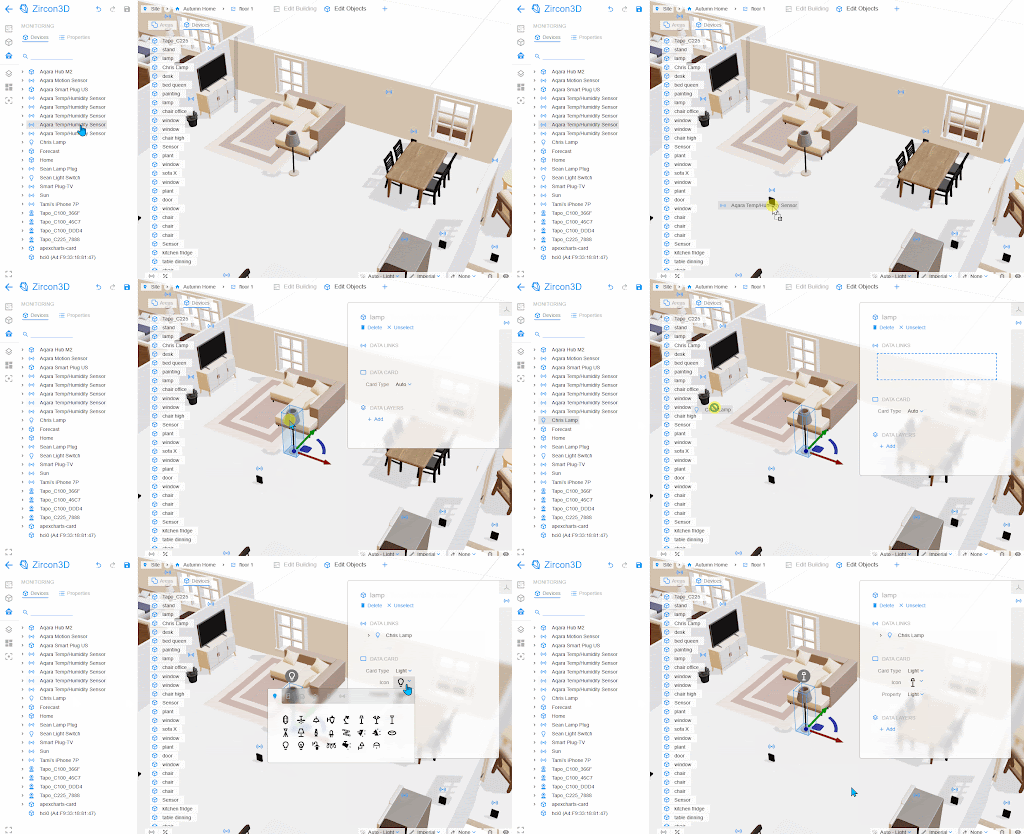
To place these devices in your 3D model, you can:
- Drag and Drop Placement: Simply drag a device from the list and drop it onto a floor to mount it directly.
- Data Link Mapping: To link a device to a specific 3D object—such as mapping a smart light bulb to a lamp model—first select the 3D furniture item. Then, drag the monitoring device into the Data Link panel on the right to complete the mapping.
-
T Tami Liu pinned this topic on
-
-
Hello! It looks like you're interested in this conversation, but you don't have an account yet.
Getting fed up of having to scroll through the same posts each visit? When you register for an account, you'll always come back to exactly where you were before, and choose to be notified of new replies (either via email, or push notification). You'll also be able to save bookmarks and upvote posts to show your appreciation to other community members.
With your input, this post could be even better 💗
Register Login